Choosing a Smart door lock solution in 2026 requires more than comparing fingerprints, apps, and glossy product images. The right choice must fit the building, daily routines, security expectations, and local requirements. A lock that works well on a showroom door may fail on an older wooden frame. Small details matter.
Real-world evaluation should begin at the entrance. Check whether the deadbolt aligns smoothly, even after repeated use. Test the keypad in rain, bright sunlight, and winter gloves. Review battery warnings, emergency power options, mechanical keys, and offline access. App permissions also deserve attention. A reliable system should explain who can unlock the door, when access occurred, and how data is protected.
Security is not only about hardware. Encryption, software updates, audit logs, user roles, and professional installation all influence long-term trust. Manufacturer documentation and independent testing can reveal more than marketing claims. Privacy policies should be readable, not hidden behind vague language. Some connected locks still depend heavily on cloud services, which may create inconvenience during outages. That weakness deserves honest consideration.
There is no perfect option.
Homeowners may prefer simple PIN access, while offices may need temporary credentials and detailed records. Rental properties require easy user management without damaging existing doors. A practical Smart door lock solution balances convenience, resilience, privacy, and maintenance costs. This guide examines those trade-offs with a cautious, experience-based approach, helping readers choose a system that remains dependable after the novelty fades.
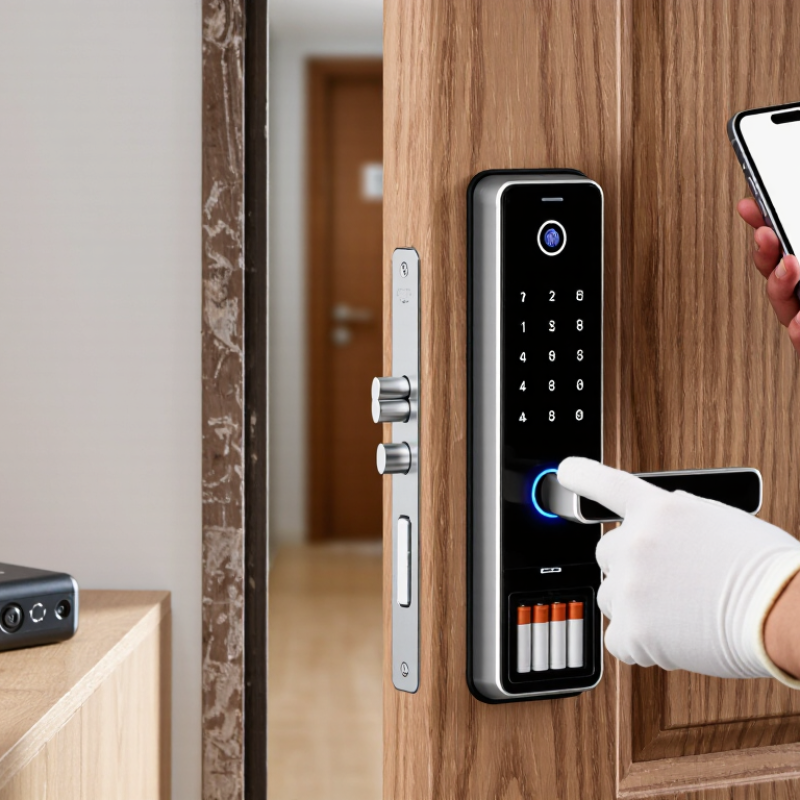
Choosing a smart door lock in 2026 should begin with your daily routine, not a feature list. Ask who needs access, when access should work, and what happens during a power or internet failure. A family may need temporary codes for a cleaner, while a small office may require individual credentials and entry records. Measure the door, frame, and lock body carefully. A beautiful device is useless if the door does not close smoothly.
Security priorities need clear boundaries. Prefer encrypted communication, strong authentication, automatic lockout controls, and prompt security updates. Check whether the lock supports local operation when Wi-Fi is unavailable. Physical keys, emergency power contacts, or a secure backup method can prevent a late-night lockout. Keep spare batteries nearby. Test them monthly. Also review data handling: access logs should be limited, protected, and deleted according to your needs and applicable privacy rules.
A professional installer should verify the strike plate, door alignment, and battery drainage after installation. Ask for documented testing rather than confident promises. Some systems report low battery too late, and some fingerprint readers struggle with wet or damaged fingers. That matters in real homes. I would also question whether remote unlocking is truly necessary. Convenience can quietly expand risk. Start with the smallest access plan that works, then review permissions after several weeks. Mistakes are useful when they are noticed early.
The smart lock market is expanding quickly. Grand View Research estimates a 19.6% compound annual growth rate through 2030. That growth creates more choice, but not always better decisions. Begin with the door itself. A deadbolt replacement suits standard entry doors, while a retrofit model can preserve the existing exterior cylinder. Lever locks fit some apartment doors, but compatibility must be checked carefully. Measure the backset, door thickness, frame clearance, and strike alignment before purchasing.
Access methods should match daily routines. Keypad entry works well for children, cleaners, and short-term guests. Mobile apps add remote control, activity logs, and temporary permissions. Bluetooth usually suits nearby use, while Wi-Fi supports remote access but may consume more battery. Fingerprint readers are convenient, yet wet or dirty fingers can cause failures. Keep it practical. According to MarketsandMarkets, biometric authentication remains a major growth area in access control, but convenience should not replace a reliable backup method.
Installation can be simple or disruptive. A battery retrofit may take minutes and leave the exterior unchanged. A full replacement offers stronger integration, but alignment problems can appear later. The U.S. Department of Energy reports that connected devices can increase household energy demand, although a single lock has limited impact. Battery access matters. I would still test the lock manually before trusting remote access. A report can show market direction, but it cannot reveal how your door behaves on a cold, rainy morning.
Choosing a smart door lock in 2026 means examining its connection before its appearance. A polished keypad is useless when your phone cannot reach it. Start with connectivity. Wi-Fi offers remote access, while Bluetooth can preserve basic control nearby. Low-power mesh connections may improve reliability across larger homes. If the internet fails, the lock should still accept a code, key, or local phone command. Test that fallback before installation.
Compatibility requires careful measurement. Check door thickness, backset size, latch movement, and available battery space. A lock can fit the door but still block the handle or strike plate.
I once treated compatibility as a simple size check. That assumption failed. Also confirm whether every household member can use the system. Temporary codes, scheduled access, and activity logs should work without confusing menus.
Smart home integration needs equal scrutiny. Look for documented support for your existing hub, voice assistant, alarm system, or lighting routines. Useful automation might turn on the entry light after an authorized unlock. It should not unlock the door automatically because a sensor misread the situation.
Review permissions, encryption details, update policies, and independent security testing. Keep a physical backup method available. Batteries often fail at inconvenient times. A monthly battery reminder and a manual lock test can prevent an avoidable night-time problem.
How to Choose a Smart Door Lock Solution in 2026?
When evaluating a smart door lock, treat security as a daily process, not a feature list. Look for strong authentication, encrypted communication, tamper alerts, and regular firmware updates. A reliable lock should notify you when someone enters, fails repeatedly, or leaves the door unsecured. Do not trust vague claims. Ask how access records are protected, stored, and deleted. Independent testing and clear technical documentation show more expertise than polished advertising.
Privacy controls deserve equal attention. Choose a system that collects only necessary data and offers separate permissions for family members, guests, and service workers. Prefer temporary codes with automatic expiration. Check whether activity logs can be viewed, exported, or erased by the owner. Cloud access can be convenient, but local control may reduce unnecessary data exposure. That detail matters.
Emergency access needs practical testing. Confirm that the lock supports a protected backup method, such as a physical key or one-time emergency code. Test access during a dead battery, weak internet connection, and damaged phone scenario. Keep spare power available, but never place it openly beside the door. An authorized emergency contact should have limited, traceable access. A physical override can improve reliability, yet it may weaken resistance to forced entry if poorly designed. I would test the entire routine before installation, not after an emergency begins. Convenience changes habits. Security depends on those habits.
| Assessment Area | What to Verify | Minimum Acceptable Requirement | Preferred 2026 Target | Emergency Access Consideration | Weight |
|---|---|---|---|---|---|
| Credential Security | How access credentials are created, stored, revoked, and recovered. | Unique credentials for each user; immediate revocation; no shared administrator password. | Passkeys or phishing-resistant MFA for administrative access, role-based permissions, and time-limited guest credentials. | Emergency credentials should be individually assigned, auditable, and automatically expire when possible. | 20% |
| Encryption and Communications | Protection of data moving between the lock, mobile device, hub, and cloud service. | Encrypted communications using current, vendor-documented protocols; rejected or deprecated encryption must not be used. | End-to-end protection where practical, authenticated device pairing, key rotation, and secure handling of cryptographic keys. | Offline emergency methods must not expose permanent credentials through an unprotected wireless connection. | 15% |
| Software Updates | How firmware and mobile applications are patched and verified. | Documented security-update process, signed firmware, update notifications, and a stated support period. | Automatic security updates with signature verification, rollback protection, vulnerability reporting, and published end-of-support dates. | The lock should remain usable through a safe fallback method if an update fails or connectivity is unavailable. | 15% |
| Privacy Controls | What personal data is collected, why it is collected, and who can access it. | Clear privacy notice, data minimization, account deletion process, and controls for sharing access logs. | Local processing where feasible, configurable retention periods, export and deletion tools, and no precise location collection by default. | Emergency events should record only necessary details and should be visible to authorized users through an audit trail. | 15% |
| Auditability | Whether access attempts and administrative changes can be reviewed. | Timestamped records for successful and failed access attempts, credential changes, and administrator actions. | Tamper-evident logs with synchronized time, export capability, configurable retention, and alerts for repeated failed attempts. | Emergency openings should be clearly labeled in the log and linked to the credential or method used. | 10% |
| Emergency Entry | How authorized people can enter during a dead battery, network outage, lost phone, or account lockout. | At least one documented backup method, such as a mechanical key, external power input, local keypad, or offline credential. | Two independent fallback methods, tested regularly, with controlled issuance and no permanently shared emergency code. | Confirm that the backup method works without internet access and that emergency use does not permanently disable normal security controls. | 15% |
| Power and Connectivity Resilience | Expected behavior during low battery, power loss, Wi-Fi failure, Bluetooth failure, or cloud outage. | Low-battery warnings, predictable fail-secure or fail-safe behavior, and documented offline operating limits. | Multiple warning stages, local access operation during temporary outages, protected battery compartment, and a clearly tested recovery procedure. | Verify the exact remaining battery warning time and test external power or mechanical override before installation. | 10% |
| Physical Protection | Resistance to forced entry, tampering, drilling, bypass attempts, and incorrect installation. | Suitable cylinder, strike plate, mounting hardware, door alignment, and installation instructions for the specific door. | Independent security testing, tamper detection, protected internal wiring, hardened mounting points, and compatibility with the door’s security rating. | Emergency hardware should be accessible to authorized responders without creating an obvious attack path. | 10% |
| Interoperability and Administration | Compatibility with existing doors, access systems, mobile platforms, and identity-management procedures. | Documented compatibility requirements, supported operating systems, local reset procedure, and clear administrator roles. | Standards-based integration, least-privilege permissions, multi-user administration, and an exportable configuration or audit record. | At least two trained administrators should be able to manage recovery without relying on one person’s private account. | 10% |
Price comparisons should include more than the lock itself. Hardware, professional installation, batteries, wireless hubs, and optional cloud subscriptions can change the first-year cost. Grand View Research’s 2024 smart lock market report projects strong market growth through 2030, but growth does not guarantee lower ownership costs. A cheaper model may need frequent battery changes or extra accessories. That becomes frustrating at a busy entrance.
Maintenance is often overlooked. Look for clear low-battery alerts, local keypad access, weather resistance, and a manual override. In my experience, battery access matters more than polished app features. A lock that needs special tools creates avoidable service calls. Parks Associates’ 2024 smart-home research highlights reliability and interoperability as continuing consumer concerns. Check whether the lock works with your existing home system, not only its advertised ecosystem.
Long-term reliability requires evidence. Review warranty length, software-support commitments, update procedures, and replacement-part availability. NIST guidance on IoT device security supports secure updates, strong authentication, and responsible vulnerability handling. These points affect maintenance, even when they are invisible during installation. Test the lock with weak Wi-Fi and a nearly depleted battery. It may fail differently than expected. I would also keep a physical key or secondary access method, because convenience can encourage overconfidence. No product is maintenance-free.
1272 Speers Rd Unit 4
Oakville ON Canada L6L 2X4
©Copyright 2020 Gosco Valves. All rights reserved.