Top 12V Mini UPS for WiFi Routers?
When a router loses power, a 12v Mini Ups can keep a home network running through brief outages. The right model may also power a modem or fiber ONT, but only if its outputs match those devices. Check the voltage, connector size, polarity, and required current before buying. A plug that fits is not proof of compatibility.
This guide to the Top 12V Mini UPS for WiFi Routers compares practical details, not just advertised capacity. It looks at output options, battery capacity, charging behavior, size, and indicators you can read at a glance. Small details matter. A clear battery display is useful when the lights go out, while an awkward cable layout can make a tidy setup frustrating. Runtime varies with the connected equipment, battery age, and actual load, so published estimates should be treated as starting points. One limitation is easy to miss: a 12v Mini Ups will not automatically support every router, even when the voltage appears correct. I would verify the device label and manufacturer guidance before connecting it. The comparisons below aim to help readers narrow their choices, while recognizing that household power needs differ.
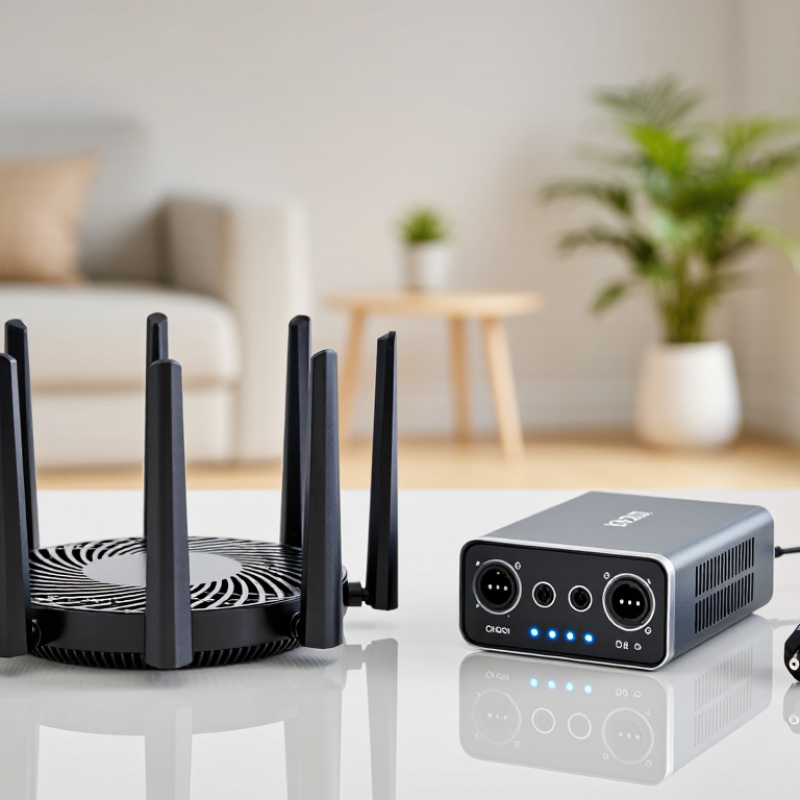
What a 12V Mini UPS Does for a WiFi Router
Top 12V Mini UPS for WiFi Routers?
What a 12V Mini UPS Does for a WiFi Router
A 12V mini UPS keeps a compatible WiFi router running when mains power disappears. It stores energy in a battery and supplies regulated 12-volt DC power through a matching connector. During an outage, it can switch to battery power quickly enough to prevent many routers from restarting. The connection must match the router’s voltage, polarity, plug size, and current requirement. Check the label underneath the router. A mismatch can mean no connection—or damaged equipment.
Runtime depends on battery energy and the router’s actual draw. For example, a 24-watt-hour battery powering a 12-watt router offers two hours in theory; conversion losses reduce that time. Small details matter. A fiber modem or optical terminal may also need backup power, or the router can stay on while internet access disappears.
Uptime Institute’s 2024 outage analysis reported that power problems were involved in 54% of significant data-center outages. That figure describes data centers, not household outages, but it shows why backup power deserves careful planning.
I would treat advertised runtime as an estimate, not a promise. Measure the full setup if possible, and allow extra capacity for battery aging and attached devices.
Key Features to Compare Before Choosing a Mini UPS
Top 12V Mini UPS for WiFi Routers?
Key Features to Compare Before Choosing a Mini UPS
A 12V mini UPS can keep a WiFi router running during a brief power cut, but compatibility matters more than extra ports. Check the router’s label for its required voltage and current, then confirm the UPS provides a matching 12V output with sufficient current. Verify the connector size and polarity, too. A plug that fits is not always electrically suitable.
Compare battery capacity in watt-hours when possible; milliamp-hour ratings alone can be misleading because battery voltage varies. Actual runtime also depends on conversion losses and the router’s power draw. Look for clear information about output stability, short-circuit protection, and whether the unit can charge while powering the router. Size and recharge time matter if it needs to sit beside a crowded modem shelf. It is easy to focus on the biggest capacity and overlook heat, cable reach, or a confusing status display.
Tips: Measure the space first. Match voltage and polarity. Estimate runtime from your router’s wattage, and leave a margin. Product estimates can be optimistic, so real backup time may be shorter.
Twelve 12V Mini UPS Options for WiFi Routers
A 12V mini UPS can keep a router online during a short outage, but the right option depends on its voltage, current, and connector. The U.S. Energy Information Administration’s Electric Power Annual 2022 reported an average of about 5.5 hours of power interruptions per customer, including major events. That figure is not a runtime target; a small UPS may only cover part of an outage. Twelve useful options include:
- a compact 1A unit;
- a 2A model for higher draw;
- a dual-output unit;
- a selectable-voltage model;
- a pass-through design;
- a replaceable-battery unit;
- a LiFePO4-battery model;
- a higher-capacity pack;
- a wall-mount form;
- a model with battery-status indicators;
- a unit with surge protection; and
- a PoE-compatible model with a suitable 12V converter.
Small details matter. Check the router’s label before buying: its required current must not exceed the UPS output, and the plug’s polarity must match. A multi-output device can be convenient, but its total capacity may be shared across ports. Estimate runtime using watt-hours divided by the router’s power draw, then allow for conversion losses and battery aging. For example, a 12W router running from a 36Wh battery will not receive three full hours in practice. Cold rooms, frequent outages, and an aging battery can reduce runtime further. Not every setup fits. I would test the UPS with the actual router and modem before relying on it; advertised runtime often assumes lighter loads.
How to Match UPS Capacity to Router Power Needs
Match a mini UPS to measured watts, not just the router’s adapter label. A 12V, 1A adapter allows up to 12W, but actual consumption may be lower. Check the label, then measure the router during active WiFi use. Include the modem if both devices need backup. Small details matter.
IEEE 802.3af-2003 specifies up to 15.4W from a PoE source and 12.95W at the powered device. IEEE 802.3at-2009 raises those limits to 30W and 25.5W. These are delivery limits, not typical router loads. Still, they show why voltage, connector type, and output current deserve attention alongside capacity. Measure reality.
Estimate runtime with watt-hours: router watts multiplied by backup hours, then divided by usable battery efficiency. For an 8W router running four hours, allow about 40Wh if you assume 80% usable energy. That equals roughly 3.3Ah at 12V. Treat this as a starting estimate; battery age, conversion losses, and a busy modem can shorten runtime. Capacity figures can look reassuringly neat. Actual results are less tidy.
Top 12V Mini UPS for WiFi Routers? - How to Match UPS Capacity to Router Power Needs
Compare capacity profiles by the router’s actual power draw. Runtime figures are estimates based on 80% usable battery energy and assume a compatible, regulated 12V DC output.
| Capacity Profile | Nominal Capacity | Estimated Usable Energy | Runtime at 6W | Runtime at 9W | Runtime at 12W | 12V Output Check |
| Compact | 18Wh | 14.4Wh | 2.4h | 1.6h | 1.2h | Check that output current meets the router’s requirement. |
| Compact Plus | 24Wh | 19.2Wh | 3.2h | 2.1h | 1.6h | Check that output current meets the router’s requirement. |
| Small | 30Wh | 24Wh | 4.0h | 2.7h | 2.0h | Check that output current meets the router’s requirement. |
| Small Plus | 36Wh | 28.8Wh | 4.8h | 3.2h | 2.4h | Check that output current meets the router’s requirement. |
| Medium | 40Wh | 32Wh | 5.3h | 3.6h | 2.7h | Check that output current meets the router’s requirement. |
| Medium Plus | 48Wh | 38.4Wh | 6.4h | 4.3h | 3.2h | Check that output current meets the router’s requirement. |
| Extended | 60Wh | 48Wh | 8.0h | 5.3h | 4.0h | Check that output current meets the router’s requirement. |
| Extended Plus | 72Wh | 57.6Wh | 9.6h | 6.4h | 4.8h | Check that output current meets the router’s requirement. |
| High Capacity | 80Wh | 64Wh | 10.7h | 7.1h | 5.3h | Check that output current meets the router’s requirement. |
| High Capacity Plus | 90Wh | 72Wh | 12.0h | 8.0h | 6.0h | Check that output current meets the router’s requirement. |
| Maximum Mini Profile | 100Wh | 80Wh | 13.3h | 8.9h | 6.7h | Check that output current meets the router’s requirement. |
| Long-Runtime Profile | 120Wh | 96Wh | 16.0h | 10.7h | 8.0h | Check that output current meets the router’s requirement. |
How to match the UPS: Check the router’s power label or adapter for 12V and its required current. At 12V, 0.5A equals 6W, 0.75A equals 9W, and 1A equals 12W. Choose a UPS with a regulated 12V output, sufficient current capacity (with some headroom), and the correct connector polarity and size.
Estimate: Runtime in hours ≈ nominal capacity in Wh × 0.8 ÷ router load in W. Actual runtime varies with battery condition, conversion losses, temperature, and changing router load. Runtime cells assume the UPS can supply the stated load.
Setup, Runtime, and Battery Care for Reliable Backup
Top 12V Mini UPS for WiFi Routers?
A mini UPS can keep a router online during a brief outage, but setup details matter. Check the router’s voltage, polarity, connector size, and required current before connecting anything. A 12V label alone is not enough. Place the UPS on a hard, ventilated surface, then connect it and confirm the router starts normally. Test the backup by unplugging the wall adapter for a minute. Watch the router’s indicator lights and reconnect power if it resets.
Tips: Estimate runtime using battery watt-hours, multiplied by realistic conversion efficiency, then divided by the router’s power draw. Treat the result as a rough estimate. Actual runtime varies with battery age, load, and temperature. A small label can hide a big difference.
For steadier backup, keep the UPS away from direct sun, heaters, and damp areas. Follow its charging instructions, and inspect cables for looseness or heat. Test the system every few months; a quick test can reveal a weak battery before an outage does. Recharge after extended use, and replace a battery that swells, leaks, or no longer holds charge. It’s easy to forget that the router may not be the only device needing power: a separate modem or fiber terminal can also interrupt internet access. Check the whole connection path, not just the WiFi box.


